
FormVerify
WhatsApp & SMS verification for HubSpot forms
Every phone number on your HubSpot forms, verified.
Before a protected form submits, the visitor enters a one-time verification code (OTP) sent to their WhatsApp, or by SMS. Real people get through in seconds. Fake and mistyped numbers never reach your CRM.
Live in three steps
From install to protected forms in minutes.
Connect HubSpot
One click, one OAuth prompt. Your whole portal is covered.
Connect WhatsApp or Twilio
Link the account you already have. OTPs send at carrier rates. hubglo never marks them up.
Add it to your site and protect
One switch on HubSpot pages, or one snippet on WordPress, Webflow, Shopify and the rest. Then pick the forms to protect.
On HubSpot pages it’s one switch. Embedded elsewhere: WordPress · Webflow · Shopify · Squarespace · Google Tag Manager
Leads your sales team can actually call.
When someone submits a protected form, FormVerify sends a one-time passcode to their phone and only releases the submission to HubSpot once it is verified. A fake, mistyped or borrowed number can't receive the code; genuine prospects pass through in seconds.
- ✓ Real submitters verify and flow straight into HubSpot
- ✓ Fake and mistyped numbers never create a contact
- ✓ Reps stop dialing dead numbers and strangers
A look inside FormVerify
Everything you set up and check lives in one place.
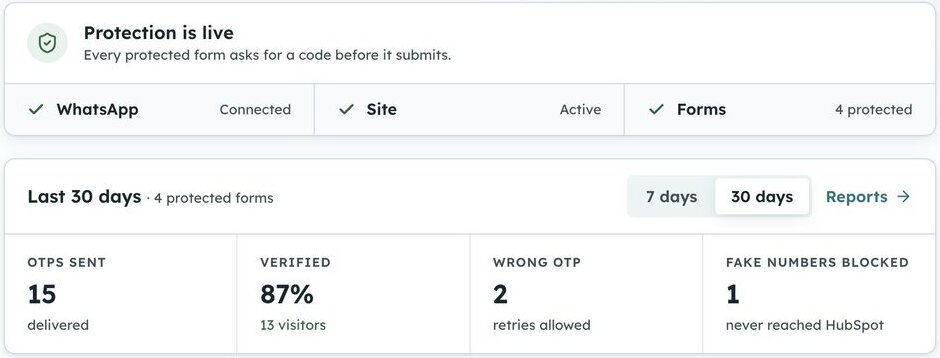
Know it’s working
- ✓ WhatsApp, your site and your forms checked at a glance
- ✓ OTPs sent, visitors verified, fake numbers blocked
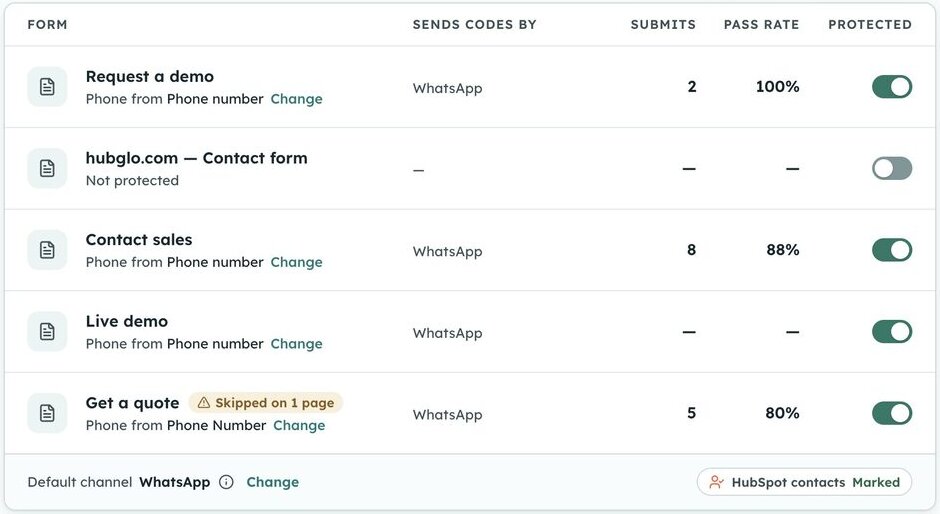
Choose the forms
- ✓ Switch protection on per form
- ✓ Each form’s submissions and pass rate
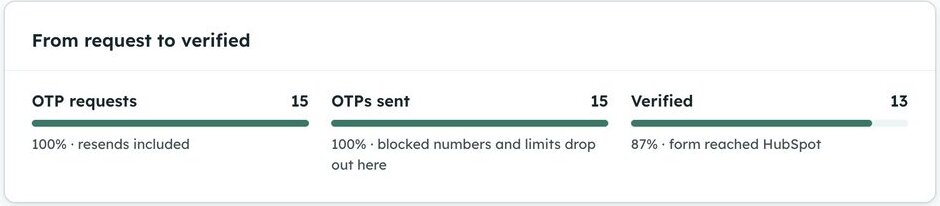
See where leads drop off
- ✓ From OTP requested to OTP sent to verified
- ✓ Spot the form where visitors give up
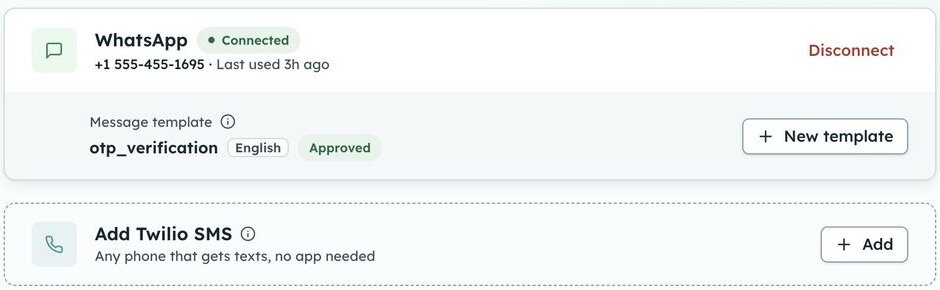
Your own WhatsApp number
- ✓ Connect with Facebook and pick an approved template
- ✓ Add Twilio SMS for visitors not on WhatsApp
Everything in the gate
Built for HubSpot teams who want clean data without busywork.
Gates the forms you already have
No rebuild. No re-embed. No new form to babysit. FormVerify gates the one you've already got.
Not on WhatsApp? Sent by SMS instead
Connect SMS too and visitors whose number isn’t on WhatsApp get the OTP by SMS, automatically.
Looks like your brand
Pick your brand color for the popup and the country used for numbers typed without a country code.
Abuse protection by default
Built-in limits stop SMS pumping cold, before it shows up on your bill.
See what every visitor did
Who verified, who gave up, which pages it ran on. Verified contacts are marked in HubSpot.
Tunable per form
Length, expiry, attempts, channel: dial it in per form. Not one-size-fits-all.
Straight talk on what it is
FormVerify verifies phone numbers. It is not a web application firewall. It works in the browser at submit time, so it dramatically raises the cost of casual spam and confirms real submitters. A determined attacker posting directly to HubSpot’s form endpoint can still bypass a client-side gate, so we tell you that up front rather than overselling it.
FormVerify questions
What teams ask before switching it on.
What does a visitor actually see?
A small branded modal: “We sent a 6-digit code on WhatsApp to +1 ••• ••• 4821”, an input for the code, and a resend link. Real submitters are through in seconds, and you can match the modal to your brand color.
Do I have to rebuild my HubSpot forms?
No. FormVerify protects your existing HubSpot forms. It installs once into your site and gates submissions at submit time, so there is no rebuild and no separate embedded form.
How are one-time passcodes delivered?
Over WhatsApp (via Meta) or SMS (via Twilio), from your own accounts, on every plan. Connect both and a visitor whose number isn’t on WhatsApp gets the OTP by SMS instead.
Can I protect only some forms?
Yes. The widget installs site-wide, but you turn OTP verification on for individual forms and map which field holds the phone number.
Is this a server-enforced firewall?
No. FormVerify gates submissions in the browser, which sharply raises the cost of casual spam and confirms real submitters. It is not a server-side block against someone deliberately posting straight to HubSpot’s endpoint. It verifies phone numbers on the forms you protect.
Clean HubSpot leads start here.
Try FormVerify free for 14 days. No credit card required.
Start free trial